Archive for Conjurer

Engine Update: Scenery, Terrain, and Hero

conjurerScreenshot3-1-13


Here are the latest new features:

Scenery: Each new level can now have scenery marked up in the level file. Scenery can be animated or static in visual appearance. Soon, I’ll get around to building lots of little knickknacks to position all over the map to stress test i. Terrain acts like terrain should, but the art for the grass is temporary. Expect something prettier when I have some trees, rocks, fences, bushes etc.

Hero: The hero  is now loaded into the game on start up. He isn’t animated yet, that will take more time and planning, but he has some rudimentary logic in place that allows him to walk around and double jump. Thanks to the Nape Physics engine, he glides over slanted hills with ease, coming to a full stop when there is no directional input from the player. Input comes from…

Keyboard commands: A dynamic keyboard mapping tool was built to allow you to swap out key values for controls. Currently the player uses the arrow keys and ‘a’ key to get around.

GamePad support: The hero can also be controlled by an Xbox360 gamepad using the left thumbstick and ‘a’ button.

Camera: A simple camera keeps the hero locked near the center of the screen. Soon, I’ll be able to limit it by a level bounding box, and have it set its attention to Entity objects other than the hero.

Console: You can now bring up a console to feed in commands to the game. Currently, you’re only able to enable and disable gamepad control, as well as load a sound or song of your choice for playback.

The UI is just for show right now. I’m building the InGameUI class to handle supporting the health bar, mana bar, inventory, and spell icons.

Thanks to Adobe AIR, I can already install this on Windows and Mac machines using the Adobe AIR installer. So far, everything works, including gamepad support, outside of the FlashBuilder dev environment. Excellent!

Feeling great about this right now. A lot of new features are getting popped out faster than ever now that the ‘hard part’ of getting the physics and graphics up and running is over.

Coming up:

Simple In Game Level Editor
More UI (Dialog screens, fonts, menus, etc)…

Go to comments... →

First major engine update

Big update today!

build1

What you’re seeing in this image is a very simple level being pulled from XML markup, parsed into Nape physics entities, and painted over with a preloaded texture that resides in a BitmapData object pool. You can’t tell, but a sound track is being played in the background and fades in from silence.

A LOT goes in to actually making this happen, and it’s so nice to finally be at this point in development!

The following engine features have been implemented over the past few  weeks:

GameObject: This class is a super class for any object that is used in game. It uses a component-based structure to handle aspects like graphics, physics, AI, etc.

DisplayManager: This class manages containers that hold various GameObjects, like background, game stage, foreground, and UI elements. It handles the ability to move into and out of full screen mode. It also initializes the ImageLibrary on start up.

ImageLibrary: This class is an object pool for bitmap and meta data for any image seen in the game. Once an image is loaded, its bitmapData and meta XML stored and cataloged in an associative array for quick lookup.

Animations, Frames, and FrameScripts: These classes are a means for a GameObject to display graphics on screen. When called by name (e.g. “walk”, “run”, “reactToHit”), an animation will dig its corresponding spritesheet image out of the ImageLibrary, then use a sequence of Frame objects to designate what section of the spritesheet to display on screen, and for how long.  FrameScripts can run on each frame, allowing me and my designers to create more dynamic looping effects, spawn particles, pause animation, etc. It’s MUCH easier to do this through a crude script markup than by tracking it in code, though it might make debugging a bit more difficult. We’ll see.

Graphics Component: This component class is used in tandem with Animations to display images on screen. Since I’ve decided to forego Startling until I’m more comfortable with designing around its API, it will use the standard Sprite.graphics object to draw items on screen.

Physics Component:  This component class is used in tandem with the Nape physics framework. It handles managing the shape, friction, material, and other attributes associated with GameObject in the game’s physics model.

AudioManager: This class manages anything audio related, whether it’s playing sound effects or music.

AudioLibrary: Similar to the ImageLibrary, this class acts as an object pool for all Sound Objects.

LevelManager, LevelStage: These classes represent how the game loads levelStage data from XML markup, parses and initializes all necessary GameObject assets, and begins the game loop.  A lot of the heavy lifting happens here, because this is essentially the game!

What a haul. But, now I have the basic backbone in place for the custom game engine. Level stages can be loaded from XML files now, which means that I can finally start in on actual game design, as well as start building a level editor for my designers. It’s been a long wait, but now the fun can finally start. Hooray!

Go to comments... →

Frustrations over Starling and Citrus

I’ve spent a rather long time trying to get a solid direction going in terms of setting up a back end asset/entity management system. I didn’t want to build one myself. It’s a pain in the ass, and a major time sink. I’ve been sniffing around looking for other frameworks to handle this for me. This week, I’ve been giving the Citrus Engine a whirl, but there have been a few rather important flaws that have popped up.

  • When entering and exiting fullscreen mode, Citrus (and implicitly, Starling), would crash due to a loss of Context Error. It’s VERY frustrating for me to chase down bugs in someone else’s framework, and after a good two days of spinning my wheels, I couldn’t come up with a working solution. Too bad. Citrus was looking very promising.
  • Starling also doesn’t seem to want to scale when Stage.displayState is set to StageDisplayState.FULL_SCREEN_INTERACTIVE. It locks the render area to the stage’s predetermined viewport size. The fix has been to increase the viewport’s dimensions to full screen dimensions, but that is NOT what I want to do. I want the resolution to remain the same (1024, 576 for example), but to have the rendered image scaled to fill the screen. I’m done trying to get this fixed. It’s  a TERRIBLE fault in Starling’s design.
  • Starling also has no support for functionality similar to Flash’s Sprite.graphics.lineTo(x, y) drawing. There are some bandaids offered by other developers, but they lack a means of transforming a texture used to fill a given polygon. What’s more, if you want to have a texture tile in Starling, it CANNOT be from a texture inside of a texture atlas. It has to be in its own separate Texture. THIS IS CRAZY! The whole point of using Starling is to utilize the hardware for maximum efficiency, and texture atlases are a large part of how you accomplish this feature!
  • I can’t seem to find very good information on using Starling for games that aren’t small, casual titles. What I find are articles on “How to make a gem puzzle” or “Angry Birds clone”, which all require a single TextureAtlas  to contain all graphics. If I’m trying to make a game that essentially looks like this, I’m going to need a hell of a lot more than a single texture atlas. Where on Earth do I even start in setting up something to handle this?

If anyone has any practical solutions to these problems, please let me know. Otherwise, I’m back to using Nape physics and my own proprietary image management for Conjurer.


Go to comments... →

New Years Resolutions

Resolution #1: More posts on the dev blog

It’s difficult to write a blog and try and keep things relevant and interesting. Try it. You’ll see what I’m talking about. You all couldn’t give a shit if I said “Been two weeks, no progress because nothing is really working yet.” But, on the other hand, living under the judgement of those who want to see my work succeed is exactly what keeps me motivated. So, expect more updates.

Resolution #2: Stop reinventing the wheel.

This is somewhat related to post 1, in that I’ve spent the last couple of weeks trying to build a new back-end graphics and physics component system to an Entity framework that controls all game objects loaded on screen. I’d already written one at BlindSquirrelGames for Beards and Glory, but given that I don’t work there anymore, I can’t really use it. That’s OK! Because that B&G framework was custom tailored to run on mobile devices, and as anyone out there who has worked on mobile game development can attest, it’s a VERY limiting platform. This time around, it feels nice to stretch my legs and not to be so constrained by such an environment.

So, it’s been rather frustrating to start from scratch, because I simply DON’T have the time. So, after doing a lot of research, I’ve decided to use the Citrus Engine. It supports two major features that I have already spent 2 weeks trying to hammer out on my own:

Rigid body physics support using Nape.

GPU-enabled rendering using Starling.

Couple that with the Xbox360 gamepad support (Windows only) that I’ve already implemented thanks to a fantastic Native Extension written by Rhuno, and it’s finally time to start cranking out some new features!

Go to comments... →

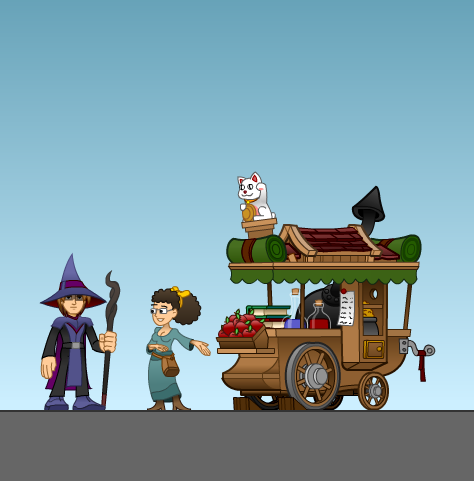
Concept art: Vendor cart and merchant, colored

Just wrapped up the color concept for the Vendor and merchant. Merchants are your typical one stop shop for items and secondary weapons.


Go to comments... →

Concept art: The Town Hall, Colored

Here’s the Town Hall, a hot spot to find new quests to help gather cash, items, and progress the storyline. The mayor… looks familiar…


Go to comments... →

Concept art: The Inn, colored

Another level asset completed. The Inn is going to be a location to pick up quests, buy and sell items, and to get an immediate heal on all stats. There will be Inns scattered all over the place, so I’ll be working on how to do a little dynamic recoloring to keep it lively.

Still working on how to implement implicit save points. In the mean time, the Inns will be where you save your games.


Go to comments... →

Concept Art: Blacksmith Shoppe

Here’s a semi final run at the blacksmith shop and black smith. You can find a link to the original concept art here.

Go to comments... →

Main Character recolor

Since I’ve decided to use XNA as the engine, this frees me up to flex my muscles in character design. I’ve retouched the look of the main character, added a few gradients here, adjusted the color scheme, added some colored strokes, and included a little more detail to his costume.

Go to comments... →

Concept Art: Main Menu

I hate drawing logos. It feels like you spend hours of your day spinning your wheels, fretting over serif versus sans-serif, twitching between 3-point kerning and 4-point kerning. It’s mind-numbing. But, in the end, you end up making something pretty good looking. It’s a thankless job. I’d never want to be a typographer.

Here’s some semi-final concept art of the main menu and logo.

Go to comments... →

Page 1 of 2 1 2